table of contents
What is Inreach?
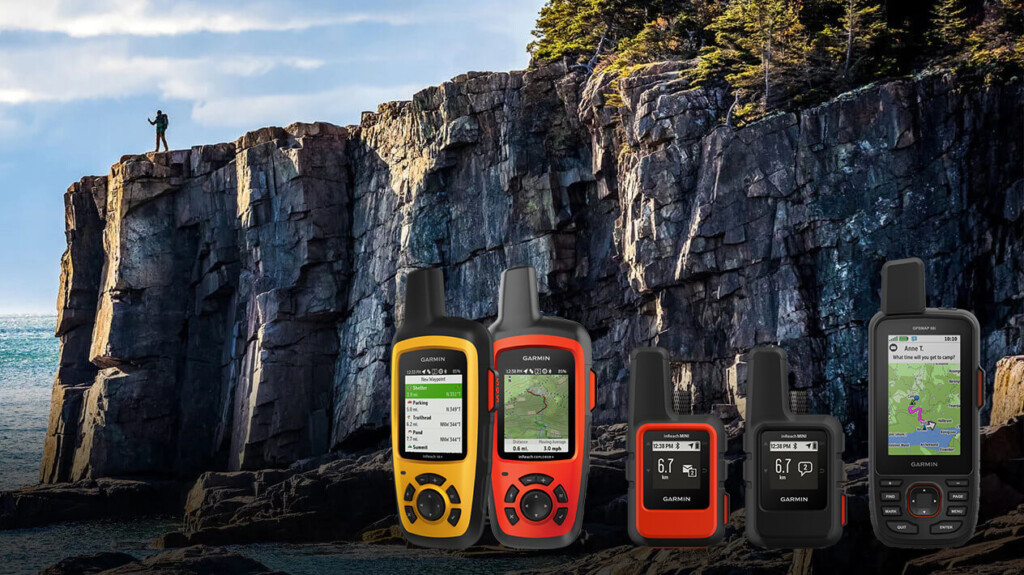
In 2018, Garmin the inReach Explorer®+ (hereinafter "Explorer +") and inReach® Mini (hereinafter "Mini") . Both are two-way email systems with location information that utilize the Iridium satellite network and can also send SOS. The Explorer+ can display maps on the device, so it can also be used as a standalone GPS. The Mini is an ultra-lightweight satellite communication device. Both can be connected to a smartphone via Bluetooth for easy email communication. The Earthmate app can also be used as a standalone GPS app.
Currently, Garmin sells inReach, but inReach was originally a product of a company called DeLorme. Garmin acquired DeLorme in 2016. DeLorme was founded in 1976 and sold topographical maps of the United States, with a market share of over 40%. In 2011, it released a two-way communication device using the Iridium satellite network. The design of the inReach website and the Garmin website is different because they are originally different products
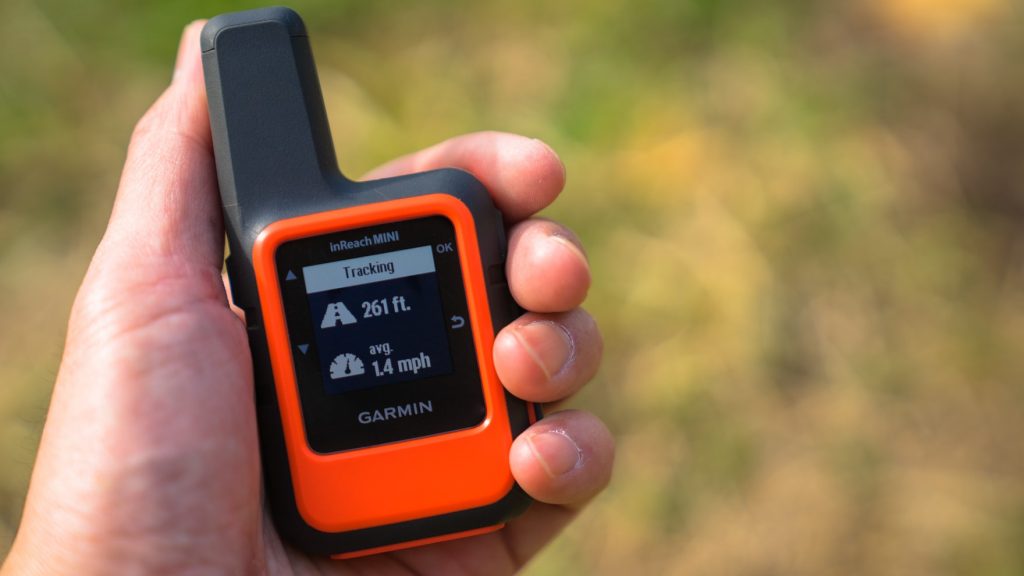
In early 2012, inReach became a hot topic among American hikers. It was discussed on the PCT mailing list. It seemed like an ideal device for hikers' safety. So I bought a first-generation inReach in 2012 and used it until 2016. I then switched to the Delore Explorer, which I still use today. I was able to borrow the Mini (Photo 1) from Outdoor Gearzine, so I wanted to compare it with the older model and check its performance
*PCT: An abbreviation for the Pacific Crest Trail, a long trail stretching 1,600 kilometers along the west coast of the United States
table of contents
- What can you do?
- Things to do first
- Basic usage
- Differences between inReach Mini and Explorer (older model)
- American hikers
- Example of use in Okutama
- Experience using inReach Mini
- When was it useful?
- To sum up
What can you do?
- The Iridium satellite network covers the entire world, allowing two-way email and SOS transmissions anywhere in the world, with the exception of Cuba, Iran, South Korea, Sudan, Syria, and Crimea due to political reasons
- As long as you can see the sky, you can exchange emails with friends from anywhere, even if there is no cell phone signal. Your friends can see your location on a map and send you emails
- You can create three preset messages and send them to multiple locations at the same time. Sending any number of these messages is free
- Connecting to your smartphone via Bluetooth allows you to freely compose messages in a familiar way. However, the inReach device cannot display Japanese. It is safer to write messages in Roman letters or English
- You can connect to a Garmin smartwatch and exchange GPX files, etc. In this case, you need to use the Garmin Connect website
- The Earthmate app can also be used as a standalone GPS app, and its great thing about it is that it downloads a wide range of topographical maps during initial setup
- MapShare allows you to share your location and message with friends along with a map, and also post it to Facebook and Twitter
- Pressing the SOS button sends an emergency signal with your location to an organization called GEOS, which will launch a global rescue operation, but this should only be done as a last resort
- Account holders can purchase up to $100,000 in rescue insurance for $18 per year
As of August 2018, messages can no longer be posted to Facebook timelines due to security reasons. However, this problem can be overcome by pasting a MapShare link into a blog or Facebook page
Things to do first
satellite communications contract
After purchasing an inReach Mini, you will need to sign up for an Iridium satellite communications contract. There are two types of contracts: personal and professional. There are four types of personal plans: Safety, Recreation, Expedition, and Extreme. Here, we will explain the personal Safety plan
The pricing for the Safety plan is shown in the leftmost vertical column in Photo 2. Up to 10 text messages are included in the price, with any additional messages being charged at $0.50 per message. Getting a weather forecast counts as one message. Tracking costs $0.10 per track. This is $12 per month for an annual contract, or $15 per month for a flexible contract. A flexible contract allows you to sign up for a monthly contract whenever you need to, but changing your contract can incur a $25 fee, so think carefully. The preset messages are free, so if you use them wisely, you can operate the plan at a surprisingly low cost
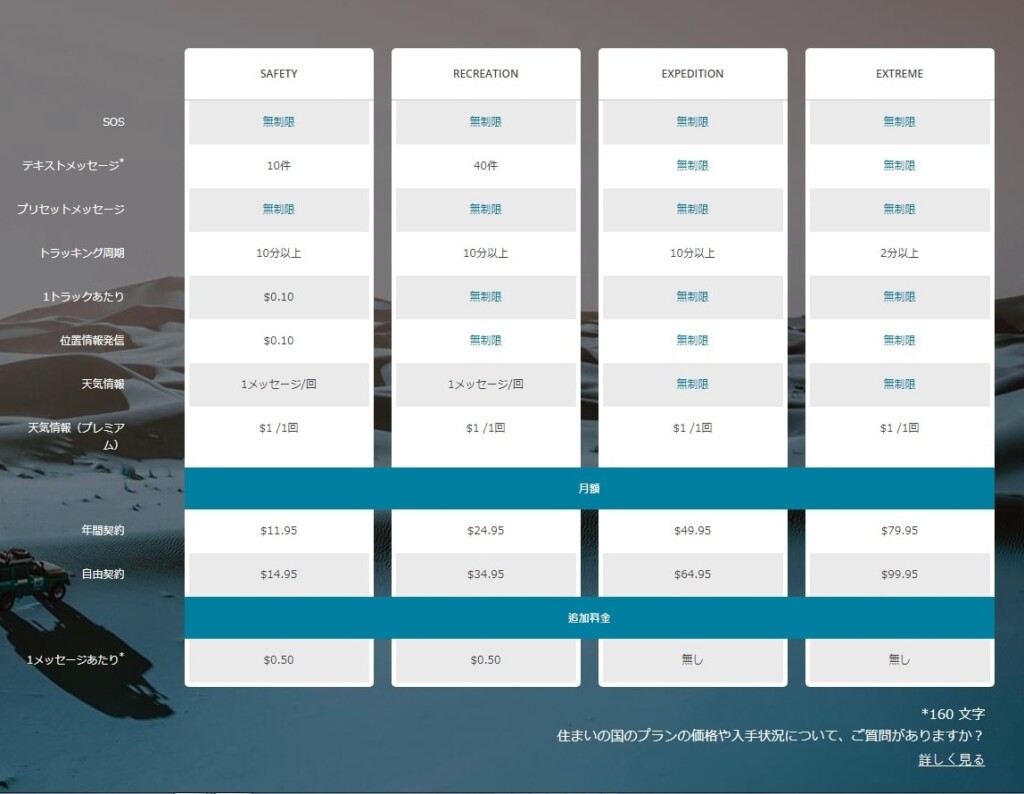
Photo 2: Take a closer look at this chart for satellite communications contracts
Once you create your account on the ExploreGarmin.com page (Photo 3) and make the required selections, your satellite communications contract will be established. This is also the page where you configure your inReach, so be sure to keep it safe. You will need a computer to perform maintenance on this page. Firmware updates cannot be performed using a smartphone alone
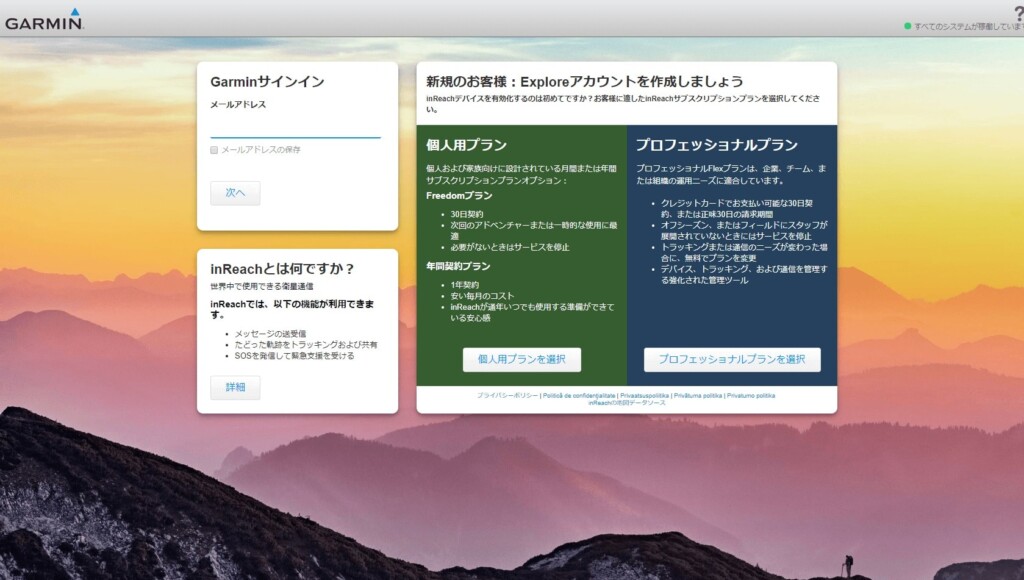
Picture 3: Create your account here. This is an important page for configuring your device
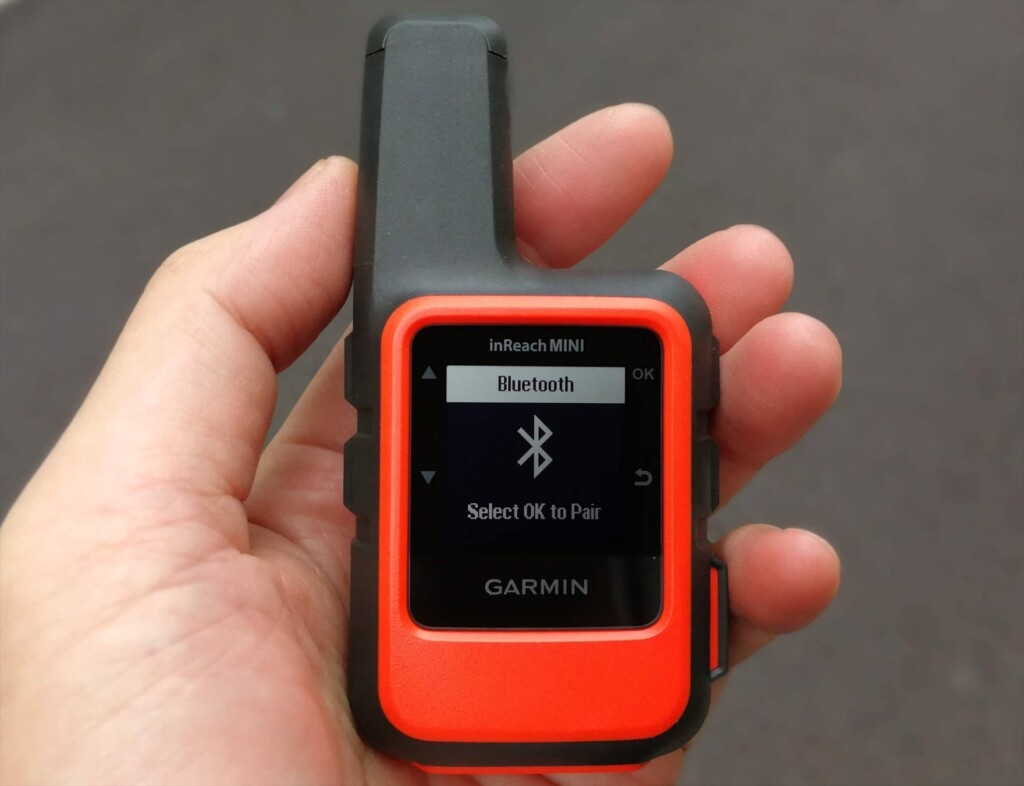
Once you've signed up online, you can activate the device. This is easy: just go to a place with a good view of the sky, turn on the Mini, and wait a while (Photo 4)
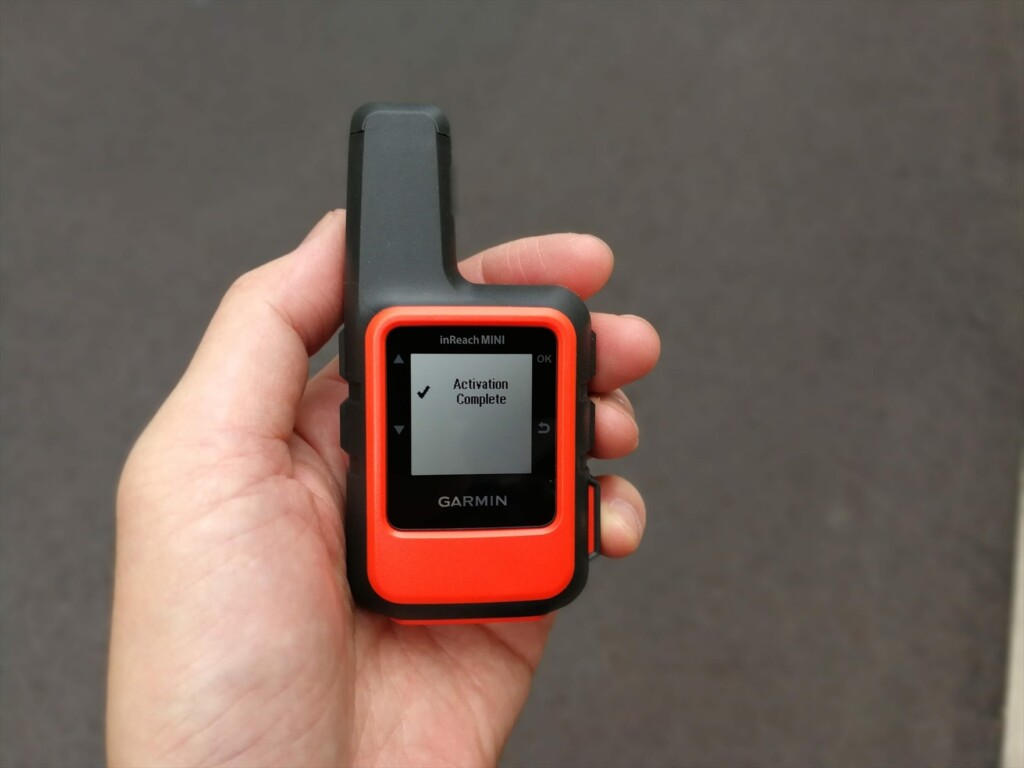
Photo 4: Once activation is complete, the screen will look like this and you will be able to use it
Pairing via Bluetooth
Install the Earthmate app on your smartphone. When you launch it, a map will appear, but the three vertical dots in the upper right corner are the menu. Clicking on this will bring up a menu with Sync, Pair, Settings, and Help. Select Pair. On the inReach, turn on Bluetooth and select Pairing mode. After a while, the inReach devices available for pairing will be displayed on your smartphone. Click on this to confirm and the pairing will be complete. Photo 5 shows the process in progress
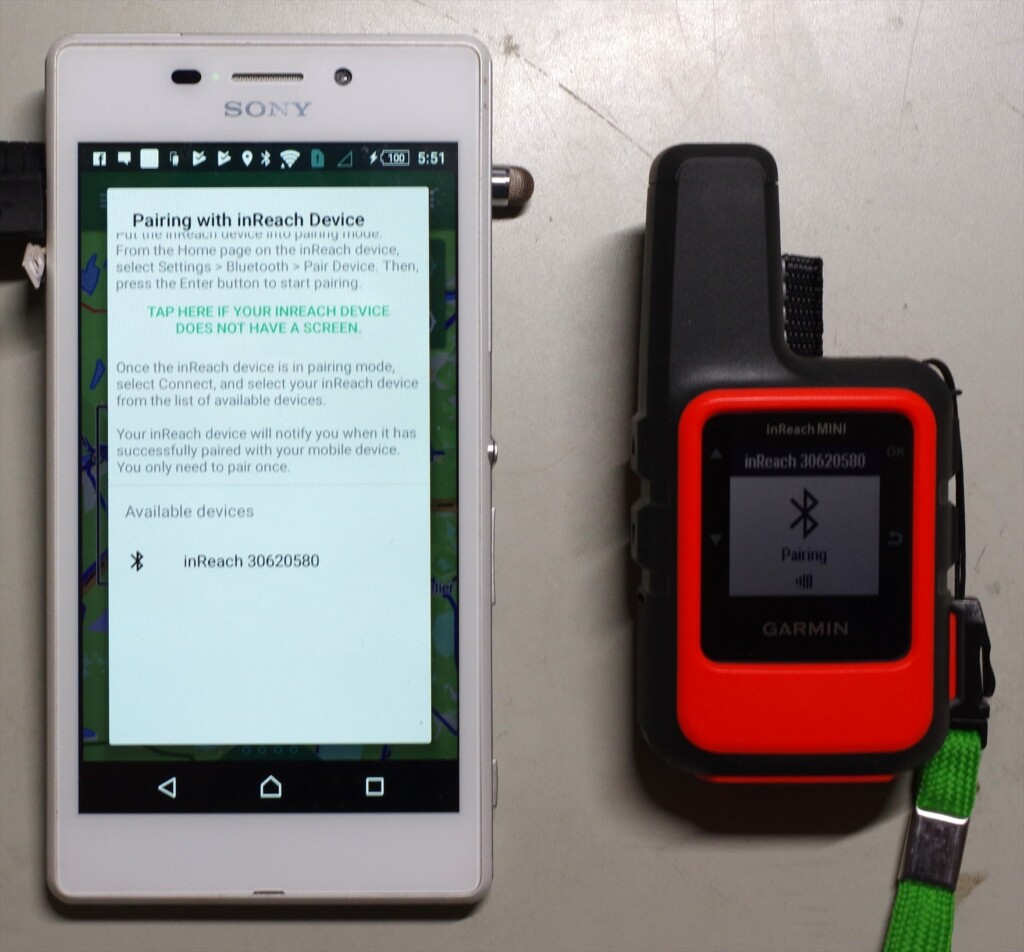
Photo 5: inReach30620580 is the device name of the inReach. Clicking on this name will start pairing
Once paired, the menu content in the upper right corner will change (Photo 6). Select Download and download the map. The base map is OpenStreetMap, and a topographical map of the entire Japan will be downloaded all at once. If you are interested, you can also download other maps
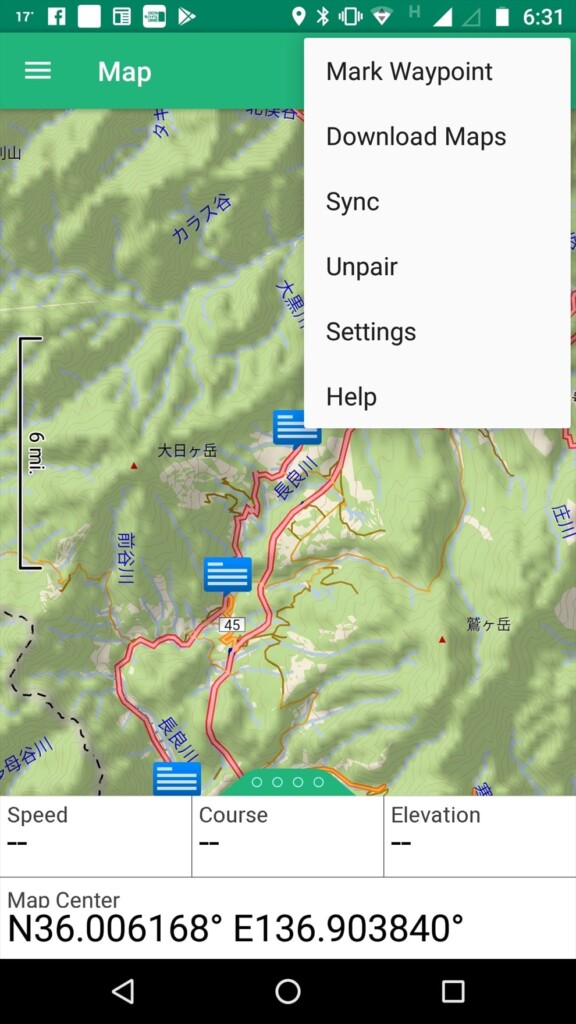
Photo 6: Top right menu after pairing
Another menu is the three lines with the word "Map" in the upper left. Clicking on this will bring up the basic menu (Photo 7). When you log on, you will see Map, Message, Tracking, Waypoints, Routes, Compass, History, My inReach, Weather, and SOS. The most frequently used options are Map and Message
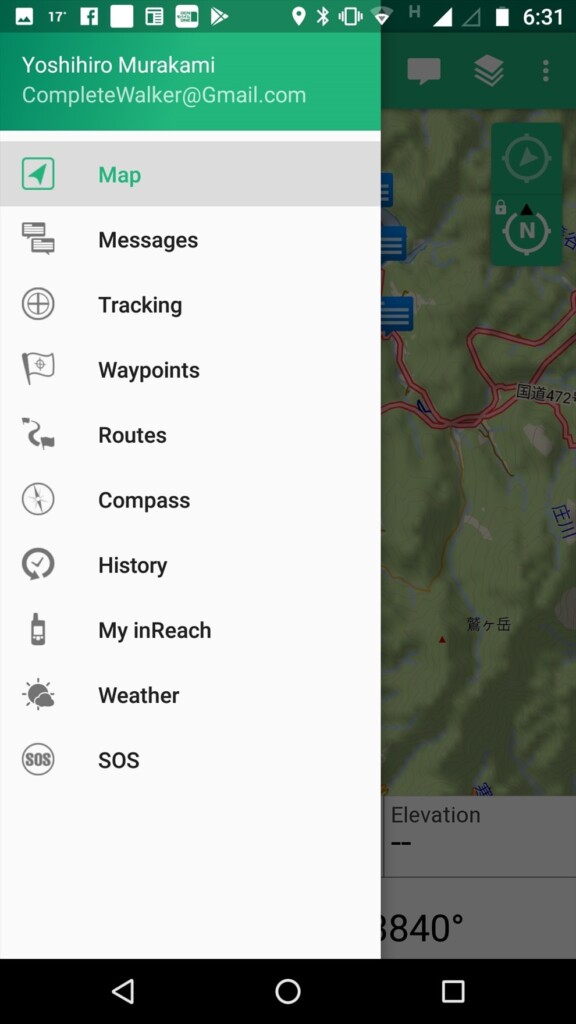
Photo 7: Tap the basic menu in the upper left
firmware
Connect the inReach to your computer with a USB cable and use software called inReachSync to update the firmware. This also synchronizes with your account, so preset text and contacts are transferred to the inReach. Photo 8 shows an image of this software in operation
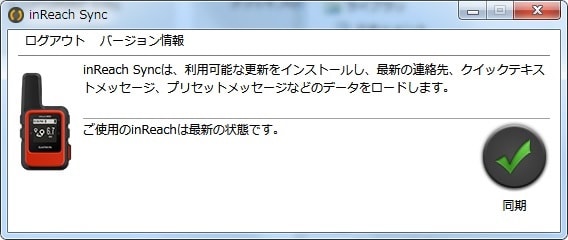
Photo 8: Update the firmware to the latest version on your computer
Firmware updates are released every few months and are essential for stable operation, so be sure to check them from time to time to keep your inReach Mini up to date
Basic usage
[Editor's note] In addition to the basic usage explained here, we have written a new article on more practical usage. If you are interested, please also refer to the article below
Creating an email
Preset Messages
Preset messages became free about two years ago. You can send as many as you want, so it's a good idea to make the most of them. Since you select messages using the keys, it takes time to select messages 1, 2, and 3 in that order. Therefore, it's a good idea to use message 1 for frequently used messages and messages 2 and 3 for less frequently used messages. In most cases, three types of preset messages are sufficient
In my case,
- Rest stop. I will go further
- Lunch time. I rest at least for half an hour
- Tent here. A good place to spend a night
In short, we only take breaks, lunch, and a tent. We take breaks every 1-2 hours, so we send our current location with the inReach Mini at those times. Even if we get lost and are unable to send an SOS, we will be found quickly because the search range is small. An example of the settings is shown in Photo 9
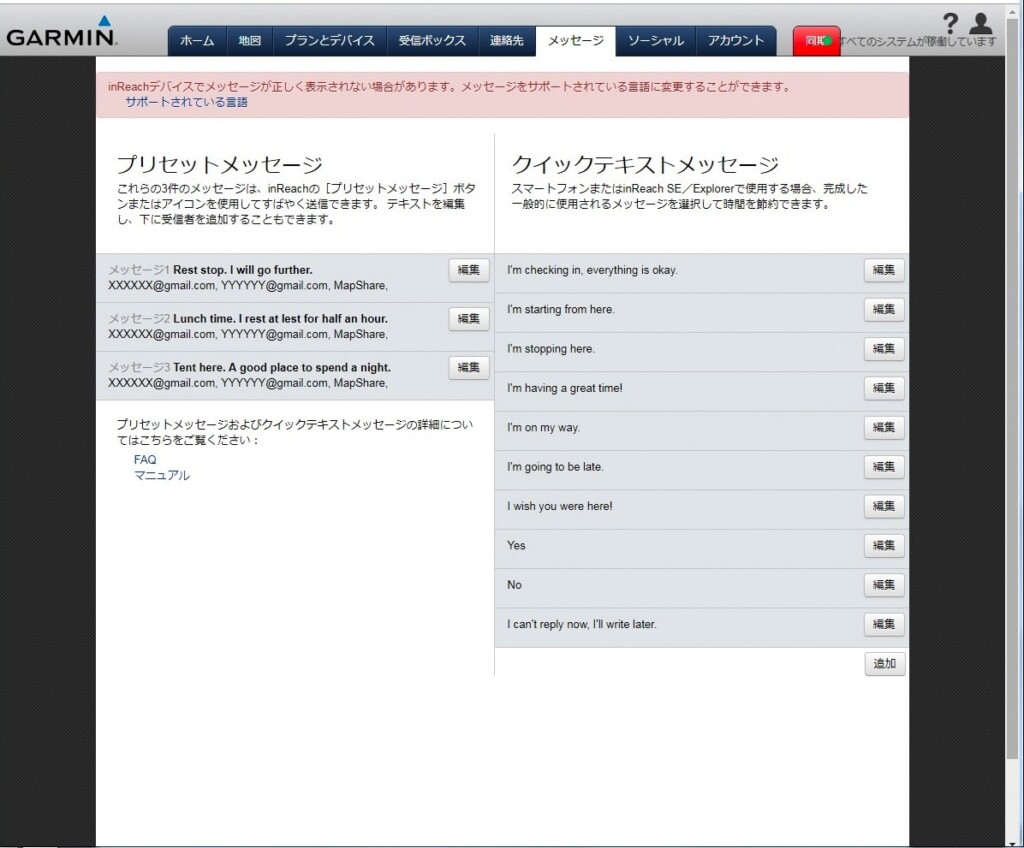
Photo 9: Message settings example. Customize it to suit your hiking style
The preset message is sent simultaneously to Mapshare and multiple email addresses. The English version of the web page also has a Facebook option, but it seems that this option has been removed from the Japanese version to avoid any issues
Quick Text Message
Quick text messages are useful when you receive an email and want to reply quickly. Select OK, Reply, and Pick Quick Text for the message you received. After selecting a quick text message, add it with Write Message and reply with Send. Figure 9 shows a default sample. You can customize it to your liking
An example of a quick text message is given below
- I'm checking in, everything is okay
- I'm starting from here
- I'm going to be late
Some hotels are out of cell phone range and require you to reply using your inReach Mini. The first sentence is likely one such case. The second and third sentences are intended for use while hiking. Since each reply requires a paid message, if you have a smartphone, it's best to just write the message on your Earthmate. I've actually written a lot of messages myself, but I've never actually used them. I usually write just one paid message after pitching my tent and having a meal
Creating a message using a smartphone
Japanese characters are available, but they are not displayed on the inReach and are therefore unreadable. Therefore, I write my messages in English. Roman characters are very difficult to read, so I prefer simple English. There's a strict character limit of 160 characters, so as long as it's understandable, that's all I need. Since I write after dinner, the English I use is limited to place names and the time
Photo 10 shows a sample message I sent from the US. It means "Dinner at Muir Pass, start at 6:40, La Conte at 9:00, Big Petty Meadow at 9:40, thunder and lightning, Muir Pass at 17:10, tent at 17:30," which is hardly English. This message arrived in Japan within a few minutes
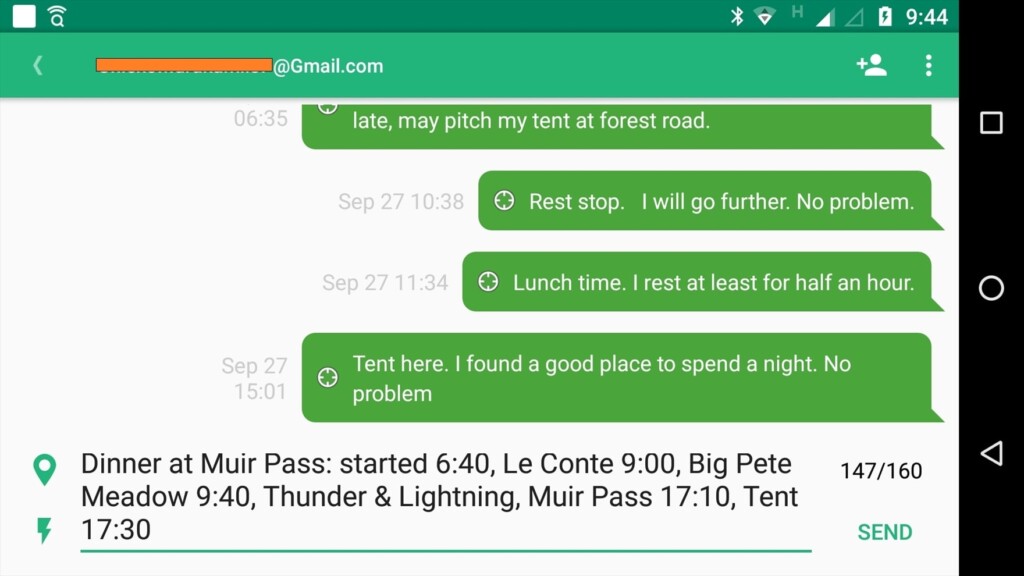
Photo 10: Creating a message using the Earthmate app (reproduced)
Use of Japanese
Japanese cannot be displayed on the Explorer+ or Mini devices. Earthmate also does not support Japanese. Therefore, I have been using simple English. However, before I knew it, Earthmate and Garmin website accounts were made available in Japanese. Aside from the fact that it is not displayed on Garmin devices, Japanese is, for the time being, available
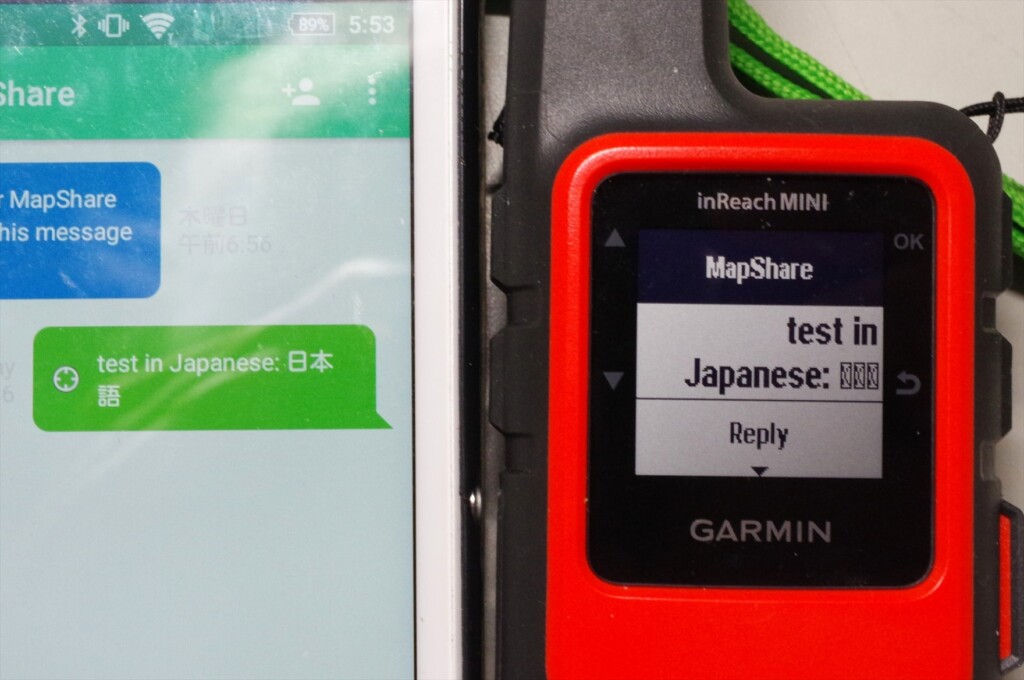
Photo 11: If you enter Japanese, it will not be displayed on the Garmin inReach MINI. However, you can still use it if you pay attention to that point
Photo 11 shows the result of creating a Japanese message on the Earthmate smartphone and sending it with the inReach Mini. The Japanese text is displayed on the Earthmate, but not on the inReach Mini
Mapshare is software that displays your messages, longitude and latitude location information, etc. on a map, and was inherited from Delore. You can take some security measures by clicking Filter Mapshare Data (Photo 13) and Configure Mapshare Settings (Photo 12) from the Social tab of your account, setting the display period and password
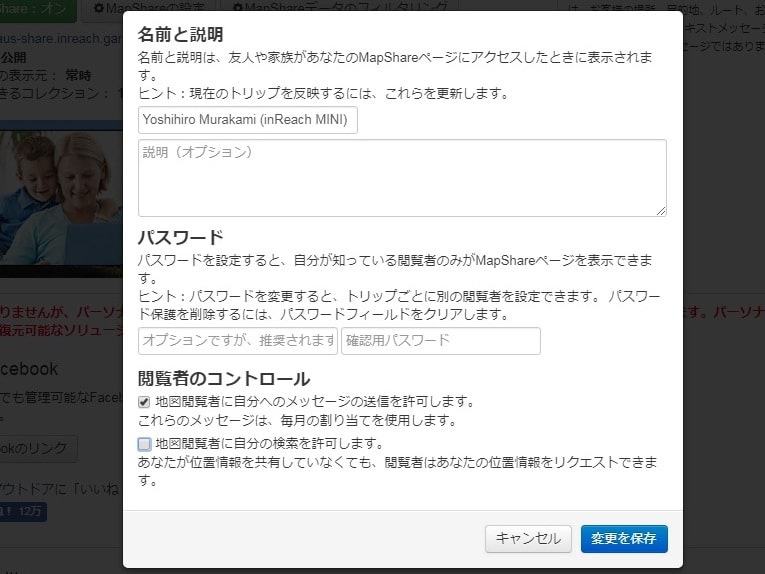
Figure 12: Mapshare preferences, where I checked the option to allow map viewers to send messages
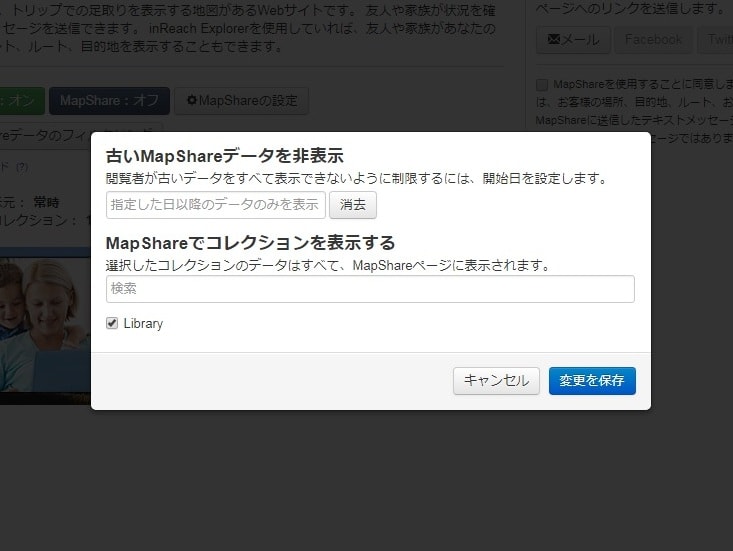
Photo 13: You can set the display period for your current location. However, this function cannot be shared via URL
However, I'm not sure if this is because I'm using an English site or if it's a bug on the web page, but even if I filter the display period, when I share the Mapshare URL, the filter is turned off. So I changed the name of this URL, and then my previous current location is not displayed
To allow viewers to reply to your map, check the option, as shown in Figure 12. Please note that there is a $0.50 fee for receiving emails, depending on your subscription
If you enable Mapshare as a reply option and share it with a friend, you will see an image like the one shown in Photo 14-a. Clicking on the detailed view of your current location in the center will attach information such as latitude, longitude, altitude, and movement speed
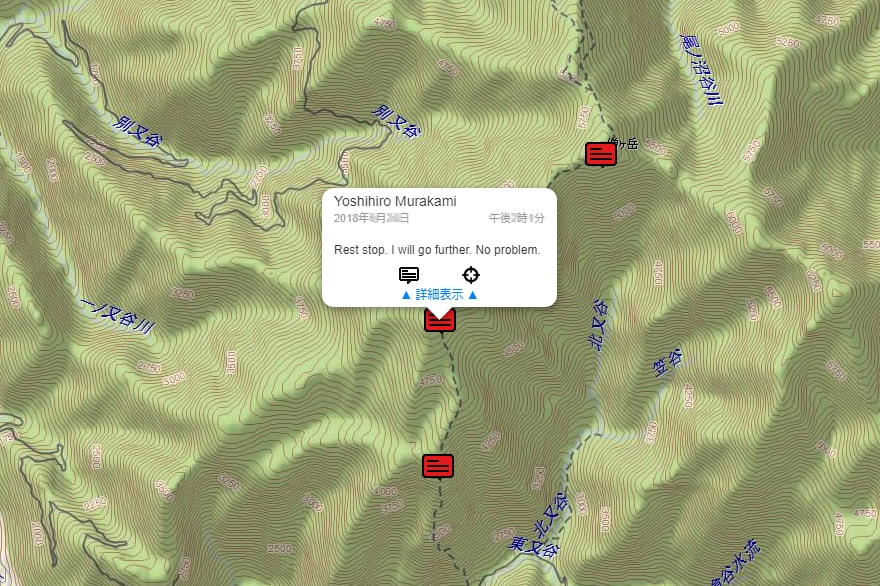
Photo 14-a: Shared location information. Clicking on the details view reveals information such as latitude, longitude, altitude, and movement speed
Clicking on the speech bubble will open a message creation window where your friend can write and send a message (Photo 14-b). This reply can be received even in the mountains where there is no cell phone signal, and can be read on the inReach Mini or a paired smartphone
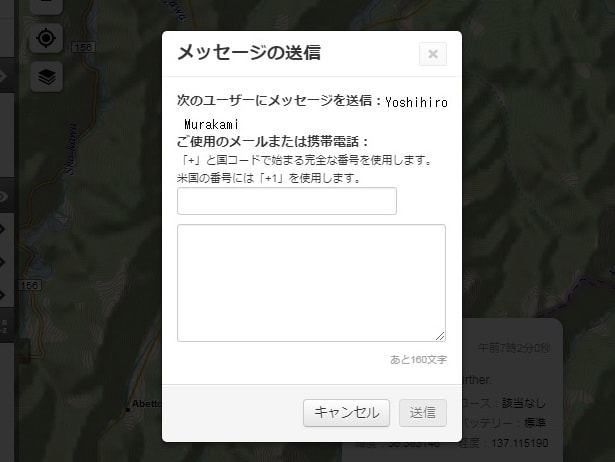
Photo 14-b: Check the reply option and click on the message on the map to display the reply window
Facebook usage
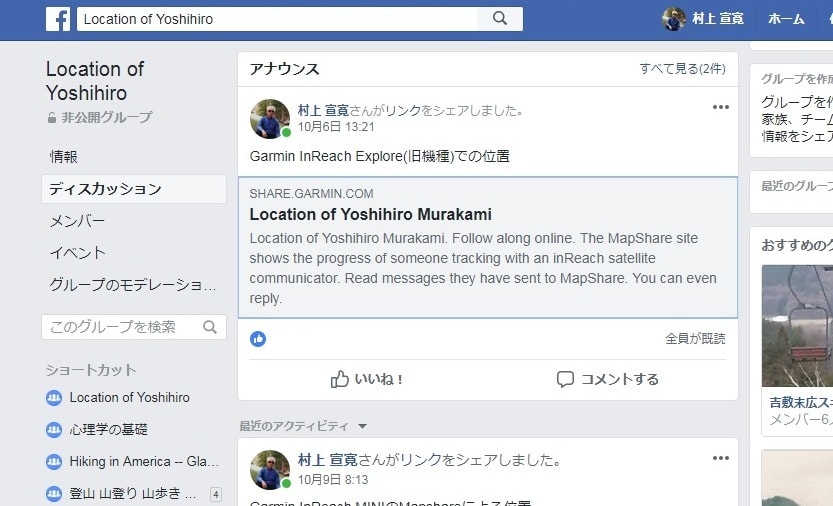
To make Mapshare public to only specific friends, copy the Map-share URL to your Facebook timeline and set the post to privacy. Another way is to create a private page showing your location information, which can only be viewed by members. Photo 15 is my example. In this case, Mapshare can be set to public
inReach Mini Menu
The default screen that appears immediately after turning on the power is shown in Photo 16-a. When you use the up and down scroll keys on the left side of the unit, the menus that appear are as follows:
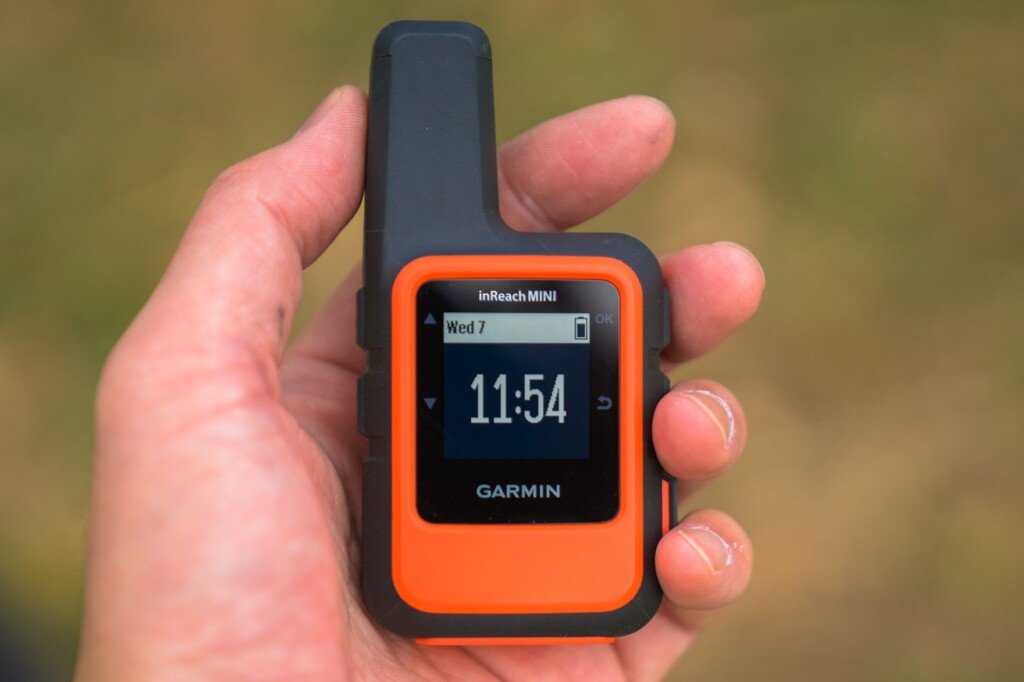
Photo 16-a
- Messages: Check received messages and create new messages
- Mail Check: This is when you intentionally check your email. Usually, emails are received automatically and a notification sound is played
- Tracking: Select when to start tracking
- Location: Check the latitude and longitude of your current location
- Displays movement speed and direction
- Bluetooth: Bluetooth menu
- Weather: Get the weather forecast for your current location
This is the menu that appears when you turn on the power and press the OK button on the right side of the unit. The first option to appear is Send Preset (Photo 16-b)
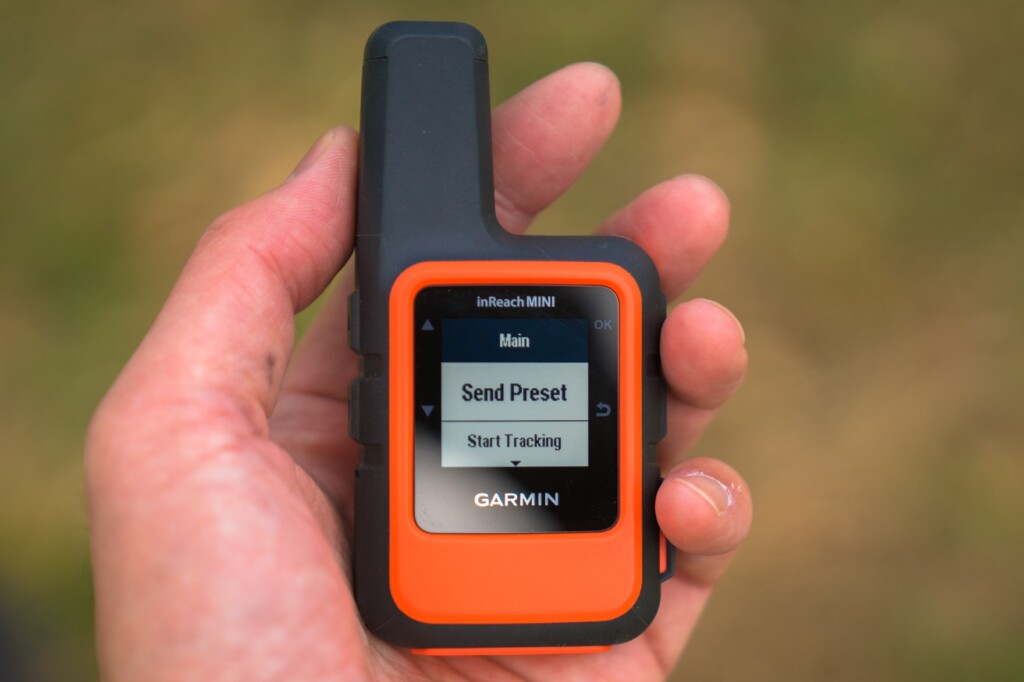
Photo 16-b
- Send Preset: You can choose from three preset messages. These preset messages are usually sufficient
- Start Tracking: Starts tracking. The Stop Tracking menu appears
- New Message: Write a new message. First, select the contacts you want to send the message to with Select Contacts. This also includes Facebook and Twitter. However, you cannot currently post to Facebook timelines. Next, there are the Write Message and Pick Quick Text menus
- Mark Waypoint: Mark a waypoint
- Navigate: Start navigation
- Utilities: Test, Contacts, Data Use
- Setup: Display, Tracking, Bluetooth, etc
You can start from either, but if you plan to use the preset messages frequently, you should probably start from the menu by turning the power on and pressing the OK button
weather forecast
InReach has launched a weather forecast service. The forecast is displayed as visual icons, temperature, and the probability of precipitation. This is convenient when outdoors. However, the results are only displayed on the device itself and are not transferred to a smartphone. The results of a query are shown in Photo 17. The response time was very fast, with the data received in about one minute
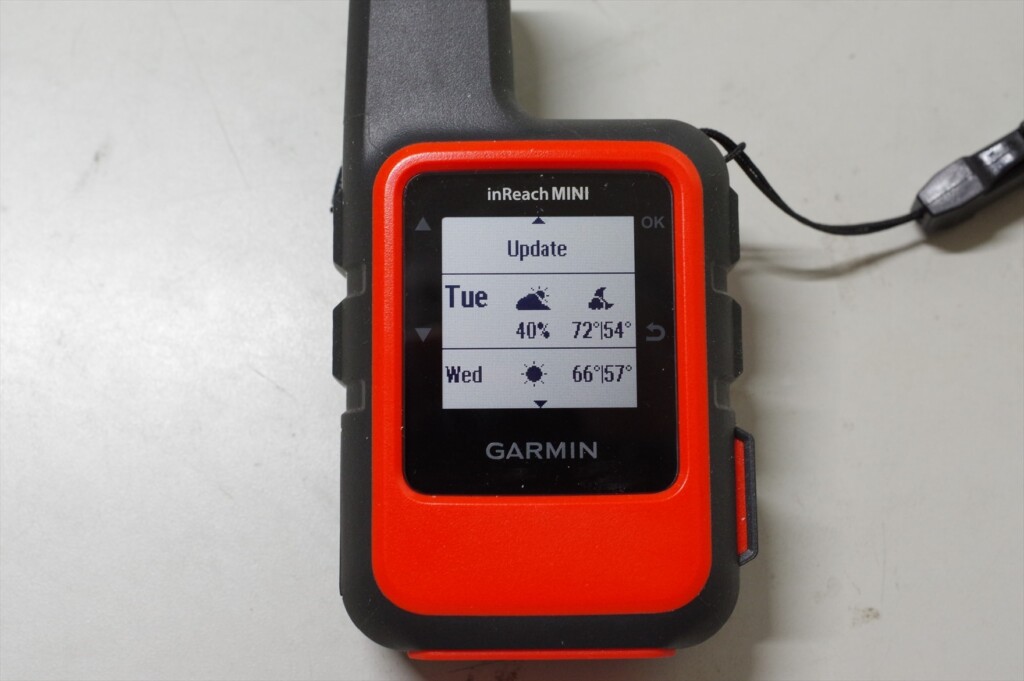
Photo 17: Current location weather forecast. This counts as one message in the basic version
The basic version of the inReach Mini shows two days of weather, temperature, and chance of precipitation. Since I hadn't set it up yet, the temperature remained in Fahrenheit. The premium version shows seven days of weather, temperature, and chance of precipitation in hourly intervals. It automatically costs $1
SOS transmission
The SOS button can be found by opening the cover on the bottom right of the device. An American hiker accidentally pressed the SOS button several times, resulting in a helicopter being dispatched each time. That's why the button is designed to be difficult to press
To send an SOS, press and hold this button, and the inReach Mini will send out an emergency signal. GEOS, an international rescue organization, will receive the signal and send you a confirmation email. You can then respond by confirming that you are experiencing an emergency
The inReach Mini will continue transmitting GPS information until rescue efforts are made. The device cannot be turned off while in SOS mode. When you no longer need to send an SOS, you can cancel the SOS by holding down the button and selecting Yes. A canceling message will then be displayed, and the inReach Mini will return to normal mode
SOS is the last resort
The SOS button is a last resort and should not be pressed unless you are in a desperate situation. Rescue by helicopter is very expensive. In the United States, there was a case where someone pressed the SOS button after a minor accident, which led to a lot of criticism. Here is an example that I remember
- This happened near Mount Whitney in the US this year. I lost the trail and it was night, but I was only using my day gear and no food. Desperate, I sent out an SOS. However, after dawn, I calmed down, investigated my surroundings, and was able to return to the original trail. My knee was injured, but it wasn't serious, so I declined helicopter evacuation. Other American hikers who found out about this harshly criticized me. Losing the trail for just a day isn't a life-or-death situation. It's not too late to send out an SOS after a day has passed. Sending out a helicopter is risky and expensive
- This is another example of a mountain accident in Japan that was featured in a mountain magazine this year. The victim slipped into a valley, injured his leg, and was unable to walk. It was impossible to climb the cliff back to the original trail, and even if he tried to descend along the river, he was trapped by a waterfall. In this case, he did not have an SOS transmitter such as an inReach, so it took about a week for him to be rescued. In such a case, he should have sent an SOS using an inReach. If he had had an inReach, it would have only taken about a day for him to be rescued
GPS may not work in narrow valleys. In such cases, even if you send an SOS, there will be no location information, so it will take a long time for rescue. As mentioned in the usage example, it is a good idea to send your current location every time you take a break. This will significantly narrow the search area, increasing the chances of rescue even if you cannot send GPS information
Differences between inReach Mini and Explorer (older model)
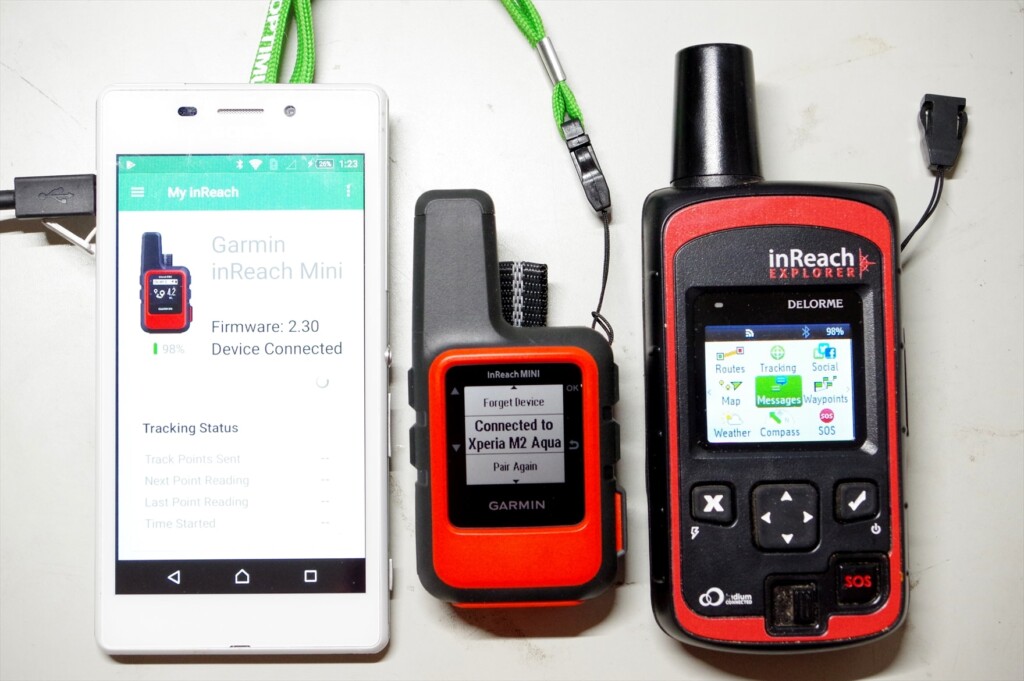
Photo 18: Smartphone, inReach MINI, inReach Explorer (old model)
I'll explain the major differences between the inReach Mini and my current Explorer (older model). I'm not familiar with the current Explorer+ (which can display maps on the device), but I think the operability is similar to the old Explorer
- The Mini weighs 100g, while the old Explorer weighs 190g. The Mini is about half the weight, and its performance is almost the same
- The Mini's GPS location accuracy and speed are comparable to the old Explorer. I turned it on and sent a message at the same time, and both were very accurate. However, under adverse conditions, such as thick clouds or in a forest, the Mini's GPS location calculation converges more slowly
- The Mini's menu is simplified, which can be confusing at first, but you quickly get used to it. It's especially nice that the preset message menu appears immediately. On the other hand, the old Explorer makes it easy to navigate by scrolling horizontally
- On the Mini, the screen doesn't change immediately after sending a message. If you return to the top menu, the sending arrow appears, but this is confusing. On the old Explorer, the sending symbol appears immediately after sending, so it's easy to understand
- The Mini starts up just by turning it on. It's convenient, but it turned on three times without my noticing it. The old Explorer would automatically turn itself off if you pressed the ON switch but didn't move the cursor to select power on. It's inconvenient, but the old Explorer is safer in terms of battery life
Although the Mini is ultra-compact, its operability is generally good. Its performance is almost the same as the old Explorer. The display screen is small, so it takes some getting used to. On the other hand, the old Explorer's menu is flat and easy to understand. It also has a cautious design, such as asking for confirmation after turning on the power
American hikers
Observing hikers in the United States, half of them are wearing some kind of satellite communication device (Photo 19). Cell phones don't work in the mountains, and there aren't many hikers there. If you break a leg or become unable to move, you'll be in danger of losing your life unless you can send an SOS with your location information
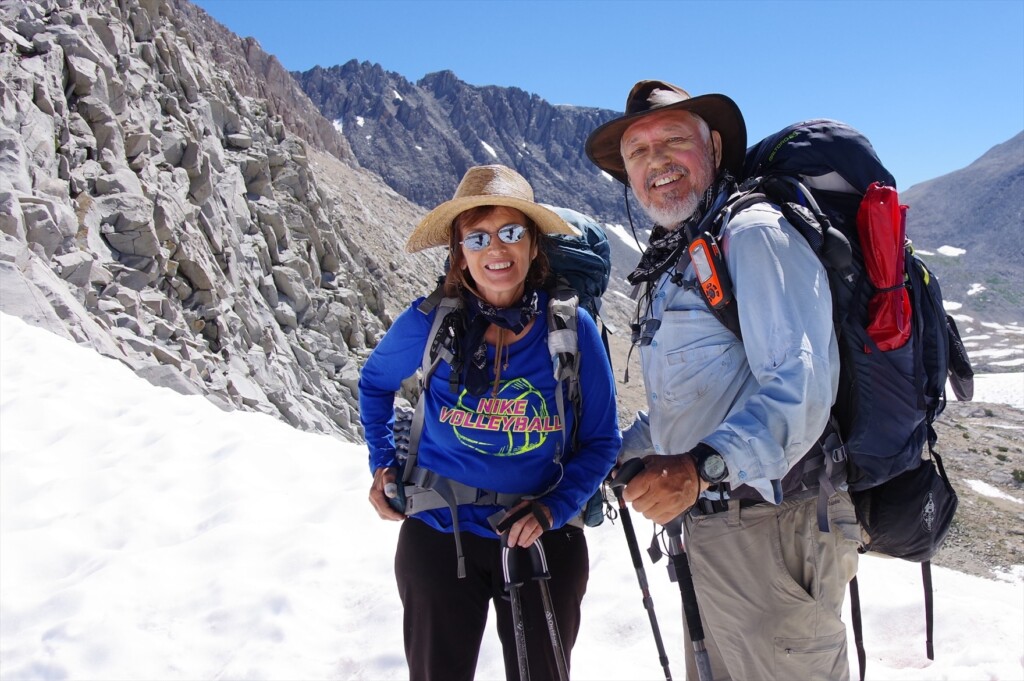
Photo 19: An American hiker I met on the John Muir Trail in 2017. He had the Explorer+ attached to his shoulder strap
In the summer of 2018, a large wildfire near Yosemite forced the temporary closure of Yosemite National Park on the John Muir Trail. I was doing the JMT heading north and staying at Vermilion Valley Village, where I was given special permission to use their Wi-Fi, so I kept up to date with news about the fire situation, including on Facebook
However, the other American hikers had no phone or Wi-Fi and had no idea what was going on. So, we tried to communicate the fire situation to the other Americans, but one group leader had an inReach so he was able to get the information. Yosemite remained closed. This group, including myself, also skipped Yosemite and instead escaped to Mammoth via Duck Lake
In this way, I think of the inReach Mini and Explorer+ as a two-way email system, not an SOS transmitter. You can send and receive emails even in the depths of the mountains where cell phone reception is unavailable, so they can be used for information gathering and other purposes. And if you gather information properly, you can ultimately avoid emergencies like getting lost. With that in mind, I think the Safety plan ($12/month, annual contract) is a bargain
Next page: Example of use in Okutama
Example of use in Okutama
Here's an example of how I use it on a circular route around Okutama (counterclockwise). The tracing function requires a fee, but sending preset messages is free, no matter how many you like, so I occasionally send my current location while walking. The usual walk takes about three nights and four days, but I chose to walk four nights, including breaks
As explained earlier, my preset messages are:
- Rest stop. I will go further
- Lunch time. I rest at least for half an hour
- Tent here. A good place to spend a night
We can simplify this to L (lunch), R (rest), and T (tent), and write the paid message as $ on the map in Photo 20
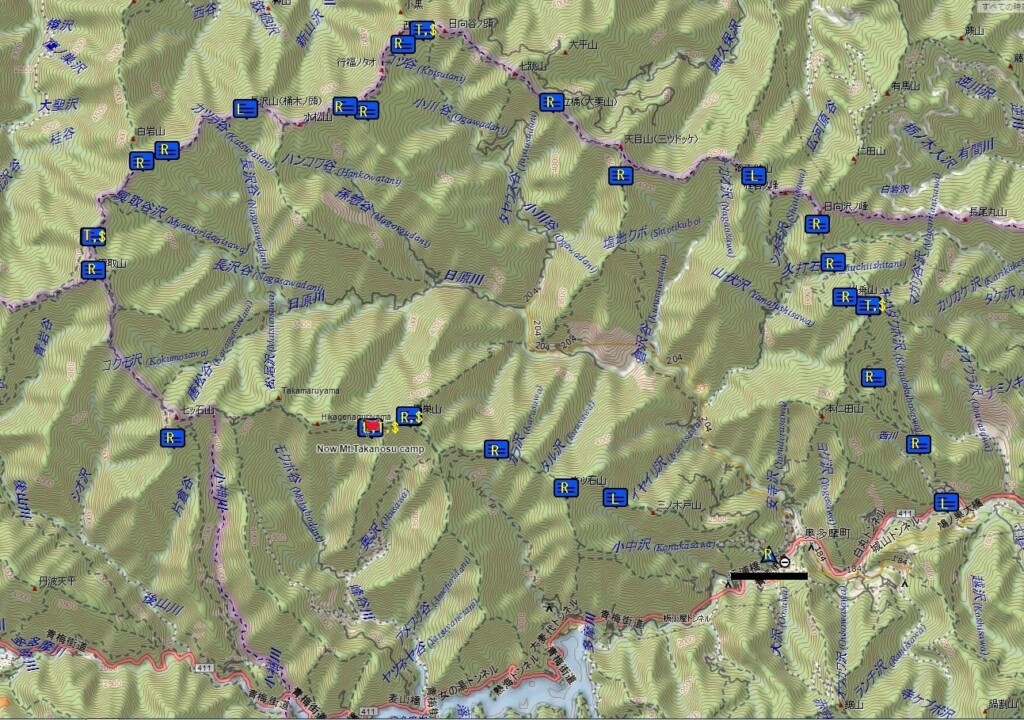
Photo 20: Okutama circular route, counterclockwise
first day
The inReach Mini's preset message is L, R, R, T from Hatonosu Station. After lunch, I received a message from a friend saying, "Have a good trip!" I didn't reply because it would cost $0.50. When a message is received, a loud warning sound is emitted, allowing me to immediately check the message on the inReach Mini
We secured 8 liters of water at a water source on Mt. Kawanori and pitched our tent on a nearby ridge, but it was already dark. Clouds were gathering and the weather was bad. After eating, we tried to send a message to conclude the day, but the GPS wouldn't converge, so we gave up. This was probably due to the thick clouds
Day 2
In the morning, the weather cleared up, so I sent a paid message to reassure everyone
Clear sky, slept for a long time, steak of the last night was delicious. I will start in
30 minutes
It was
The preset messages after this are R, R, R, L, R, R, T. We took a photo of Mt. Fuji from the peak of Mt. Kawanori, had lunch at Mt. Sobaguru, repaired the water source (repairing a loose pipe, fixing the pipe with rocks, stacking stones to place the water bucket horizontally, etc.), and arrived at Toridani Hut at 16:40. As it was unmanned, we stayed overnight. The final paid message is,
Now, Toritani hut. No one here, started 7:30, Odori-daira 9:00, Mt.Sobatsubu, lunch, 11:00, Ippaimizu 13:30, here 16:40
Now, Toritani hut. No one here, started 7:30, Odori-daira 9:00, Mt.Sobatsubu, lunch, 11:00, Ippaimizu 13:30, here 16:40
It was
Toridani Hut is built on a steep slope, with little open sky. It took about five minutes to send a preset message, and more than ten minutes to send a paid message. The Mini's GPS seemed less stable in adverse conditions. The older Explorer model also took a little longer, but still less than ten minutes
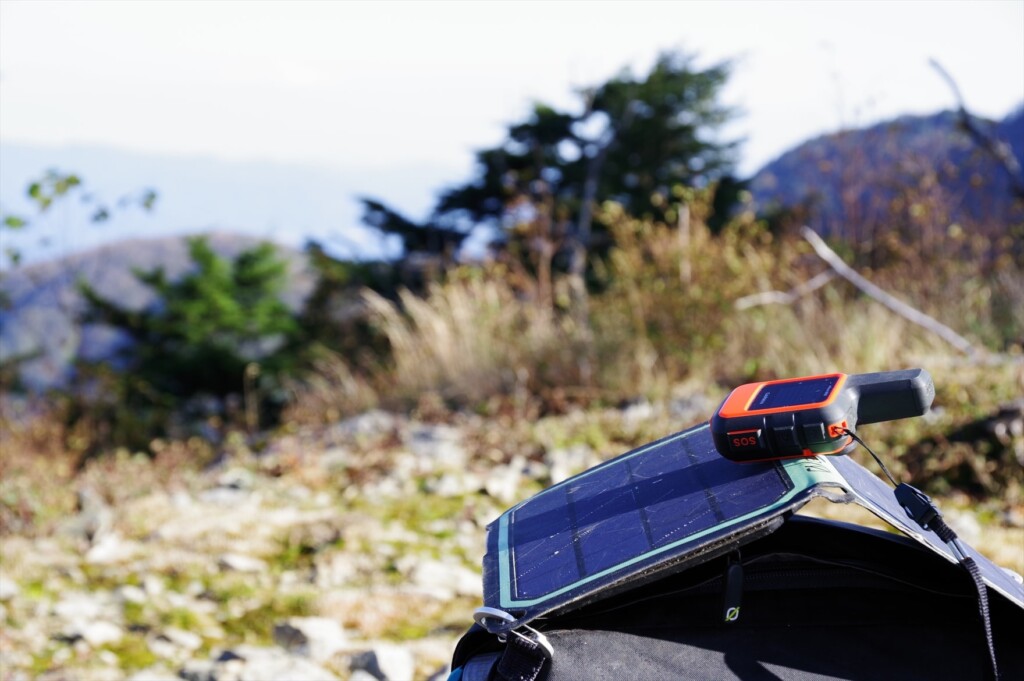
Photo 21: inReach MINI sending a preset message during a break
third day
The weather and my physical condition improved, so I walked smoothly. The preset message was R, R, R, L, R, R, T. I had lunch near Imonoki Dokke, and remembered all the ups and downs of the Nagasawa Foreland, so I passed through without any difficulty. I arrived at the Kumotoriyama campsite at 14:30. The weather was getting worse, and I was able to use my smartphone while it was still light, but it lost signal in the evening. The message after dinner was,
Now Mt.
Kumotori campsite: started 7:00, Mt. Nagasawa 10:15, lunch 12:10, Mt. Imonoki-dokke 13:00, here 14:30
It took some time to send this message. When clouds appear, GPS location calculations seem to be delayed
Day Four
It was a cloudy, windy, and cold day. The preset messages were R, R, T. The summit of Mt. Kumotori was out of range, and we could only see the base of Mt. Fuji, so our motivation was dropping, and we took a detour from Mt. Nanatsuishi to Mt. Takamaru. Around noon, we set up our tent at the campsite on Mt. Takanosu. The final paid message was,
Now Mt. Takanosu campsite: started 7:30, Mt. Kumotori, slight view of
Fuji, Alternative trail of Mt. Nanatsuishiyama, here 11:50Now Mt. Takanosu campsite: started 7:30, Mt. Kumotori, slight view of Fuji, Alternative trail of Mt. Nanatsuishiyama, here 11:50
I couldn't think of the English word for the detour, so I decided to take another route, but it wasn't too winding, so it didn't seem too bad. I brought 8 liters of water, took a nap, and stayed in the tent until after dinner. The radio said it would rain in the evening. There was no one staying in the shelter, so I packed up my tent and moved away
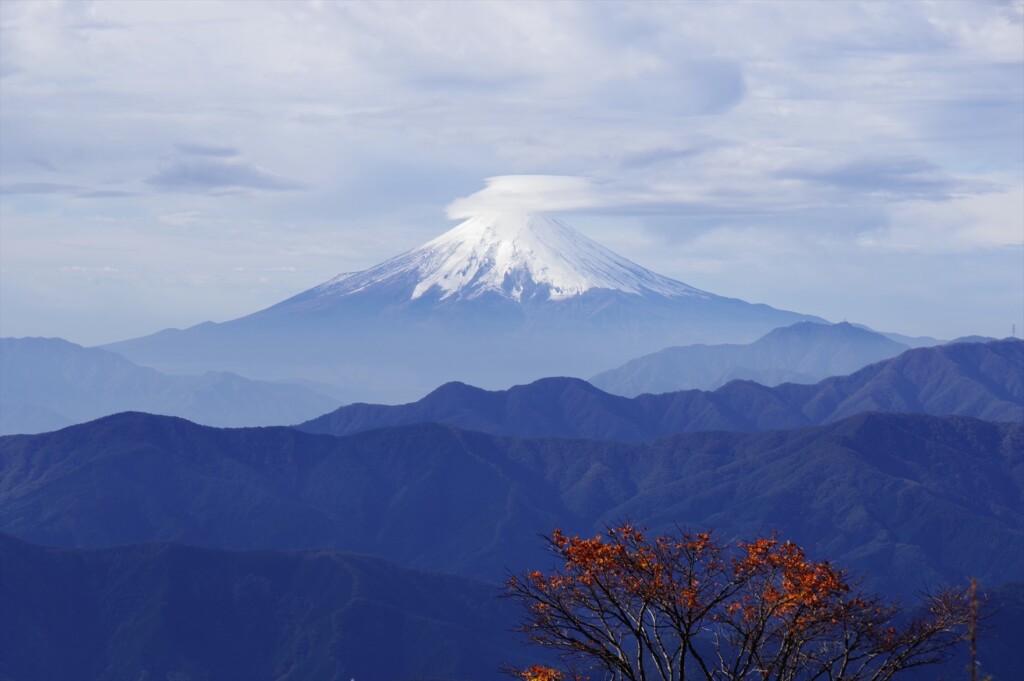
Photo 22: I waited an hour for the clouds to disappear, but the cap clouds remained
Day 5
On the last day, I took a photo of Mt. Fuji from Takanosuyama, then just went down. The preset message was R, R, R, L, R. I didn't need a paid message, but the weather was improving. So I waited for an hour at Takanosuyama and took a photo of Mt. Fuji. I didn't want to worry anyone,
for a clear view of Mt. Fuji. Cloudy,
rained at night
I sent "R." I had lunch after finishing Ishione Ridge, and from here on, my smartphone was within range. I sent "R" near Okutama Town, so that I could confirm that I had arrived safely
Experience using inReach Mini
The inReach Mini packs an Iridium satellite communication device and a GPS device into a tiny 100g case. The screen is small and the display is simplified. The GPS performance is not very high
On older Explorer models, once the GPS position calculation is complete, the word "3D" will appear. If the Iridium satellite is detected and communication is in progress, a two-way arrow will appear. This tells you that communication will end after a short wait
However, with the inReach Mini, you cannot tell if the GPS position calculation is complete unless you switch to the Location screen in the menu. Also, you cannot tell if the Iridium satellites have been identified unless you return to the top screen. This is shown in Photo 23. It is still inconvenient
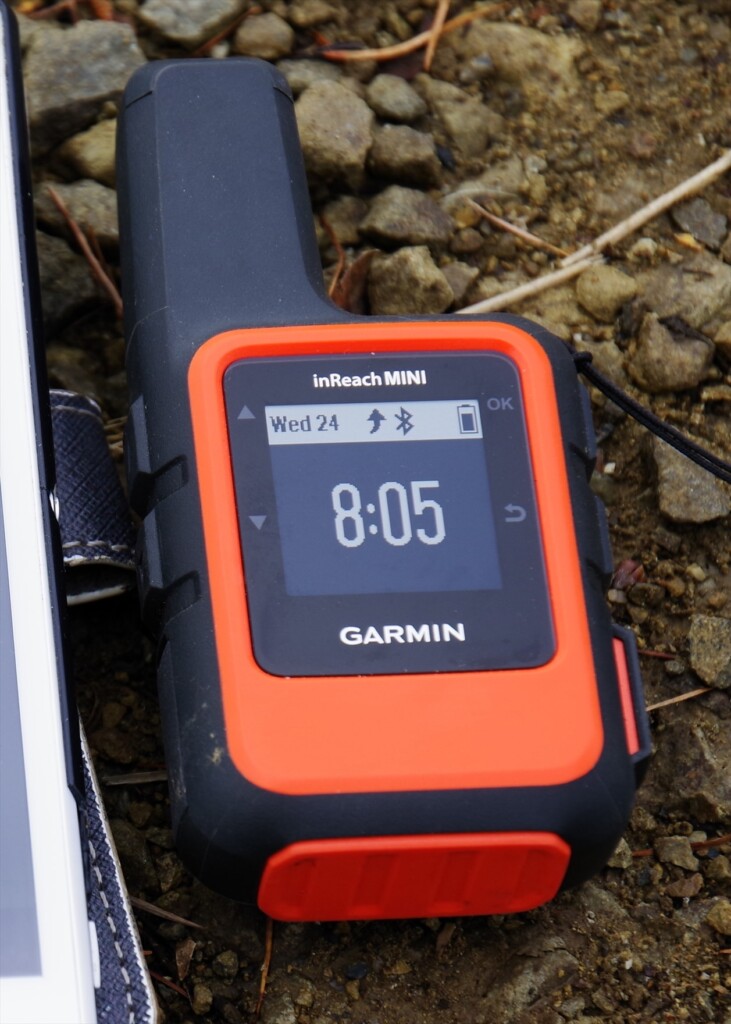
Photo 23: Once the GPS position calculation is complete and you are communicating with an Iridium satellite, a curved upward arrow will appear. After a while, the transmission will be successful
A GPS device tracks three or more GPS satellites and uses the slight time difference in the radio waves from them to calculate its current position, then uses this provisional position to repeatedly calculate and reduce the error.When this error falls within an acceptable range, the current position is considered to have converged
The Mini's built-in GPS works quickly in clear weather. It's very accurate, with a position error of about one meter. However, the speed of position calculation drops significantly in cloudy weather, through woods, etc. This may be because the sensitivity of the GPS unit is not very good. In any case, it won't finish calculating the position until it can calculate an accurate position
In fact, I always carry a standalone GPS called Map64s with me. This GPS is extremely capable; it calculates your current location and displays it on a map within 10 to 20 seconds of turning it on. It even successfully calculates your location in the woods, on a train, or on a bus. Garmin's standalone GPS displays your current location even if there is an error of about 100 to 200 meters, and then corrects the error over the course of 1 to 2 minutes, eventually reducing the error to about 1 meter. It's a bit rough, but it's practical
The inReach Mini and the old Explorer do not consider their location calculations complete until they have determined an accurate location using GPS. This seems to be a difference in strategy, or rather, in their calculation philosophies. They seem to dislike sending inaccurate location information. Delore was absorbed into Garmin about two years ago, but I get the impression that Delore still exists independently within Garmin
Although Explorer+ can display maps, I suspect that its GPS performance and location calculation algorithms are far inferior to those of the Garmin Map64s. Standalone GPS devices like the Map64s have the advantage of being able to download free topographic maps from around the world from GPSFileDepot (https://www.gpsledepot.com/). For the time being, it's probably best to use both a stand-alone GPS and an inReach Mini
When GPS does not converge
What to do if the GPS position calculation does not converge and you cannot send an email? In most cases, the Mini will be able to detect the Iridium satellites, so it is best to ignore the GPS and send the email. In other words, if you cannot send the email no matter how long you wait, leave the smartphone as it is
- Power your inReach Mini OFF, then ON
- If a message is being sent, a menu appears with the options Wait for GPS and Send Anyway
- Select Send Anyway
This option will solve the problem if necessary. If a message is in the process of being sent, resetting the smartphone will not cause the message to be lost. In my experience, turning on the inReach before composing the message on the smartphone increases the chances of the message being sent successfully
When was it useful?
Let me share some experiences that I found very helpful
The water purifier broke
In August 2012, while hiking south from Yosemite on the John Muir Trail, the pump in my water filter broke after passing Muir Pass. The water in the United States isn't clean, and I wanted to drink unpasteurized water, so I was in a difficult situation. Fortunately, I was with a Japanese hiker for a while, so I borrowed his water filter for a day. My wife and I were scheduled to meet up in Bishop, so I sent a message via inReach to secure the water filter
There's a large mountaineering equipment store in Bishop, but they don't always have it in stock. They arranged for a water filter to be secured before I arrived. This was the first-generation InReach. It ignored my location information, so it seems I was in Africa
My camera broke
In July 2015, I retired and stayed in Pinedale for two months, hiking the Winds. On my second hike, the autofocus on my SLR stopped working. Manual focus was possible, but it was inconvenient. So I sent an email via inReach to my wife in Japan, asking her to send me a replacement camera. When I returned to the hotel after my second hike, my other SLR was waiting for me
After my first hike, I managed to hitchhike and get a ride. However, the roads were the worst in the winds, and I was bouncing around in the car. The autofocus part of the lens broke, and the camera itself was on the verge of collapse, and it stopped working after a while. However, thanks to a replacement model, I was able to capture many spectacular views of the winds. This was also thanks to the first-generation inReach. It's common for there to be no camera stores in rural American cities
muscle tear
In August 2017, I was walking north on the John Muir Trail. It was a year with record-breaking snowfall, and I avoided river fording and did a lot of cross-country skiing. Perhaps this fatigued my leg muscles. As soon as I jumped over a stream and landed on a rock on the opposite bank, I felt a sharp pain in my left leg. I later learned I had torn a muscle in my calf
I was still south of Mather Pass, and it was still three days and two nights until I reached Bishop. I was planning to meet my wife there and hike the loop trail that included Muir Pass. I was in a lot of trouble, but after taking some painkillers, the pain went away and I was able to walk. I called in to say I'd be delayed due to an injury to my foot. In the end, my wife extended my stay at the motel by about three days. I couldn't use my legs on the climb, so I arrived in Bishop a day late
Because I had internal bleeding in my leg, I gave up on the loop trail and decided to hike to Bishop Pass, a three-day, two-night round trip. My leg recovered in about a week, and I walked to Yosemite. I used the inReach Explorer, which I still use today
I didn't press the SOS button because a torn muscle is just a small piece of muscle, and I can walk after taking painkillers. If it was a torn Achilles tendon, I would have had no choice but to press the SOS button
To sum up
The inReach Mini's GPS has the drawback of slow convergence under adverse conditions. However, in good weather, the location information is accurate. Even if the GPS does not converge, two-way communication using Iridium satellites is possible anywhere. The cost of the device is around 40,000 yen, and a one-year contract costs $12 per month. It weighs 100 grams. Honestly, there's no reason not to use it
The SOS button on the inReach Mini should only be pressed in a desperate situation. If you find yourself in a difficult situation, you can send an email to a friend to try to resolve the situation, even if you don't press the SOS button. Currently, there are very few Japanese inReach users, so I have shared my experience and how to use it
It's not uncommon for a missing person to take a week or even two to search for in the mountains of Japan. A long search can mean lost lives. However, this sort of thing could be prevented by introducing the inReach Mini. I hope that tragic accidents in Japan will never happen again
I borrowed an inReach Mini from Outdoor Gearzine and had the opportunity to write a review. I'm simply a longtime inReach user and have no vested interest in Garmin
[Editor's Note] As mentioned earlier, in addition to the basic usage explained here, we have written a new article on more practical usage. If you are interested, please also refer to the article below
Nobuhiro Murakami



Related reading