



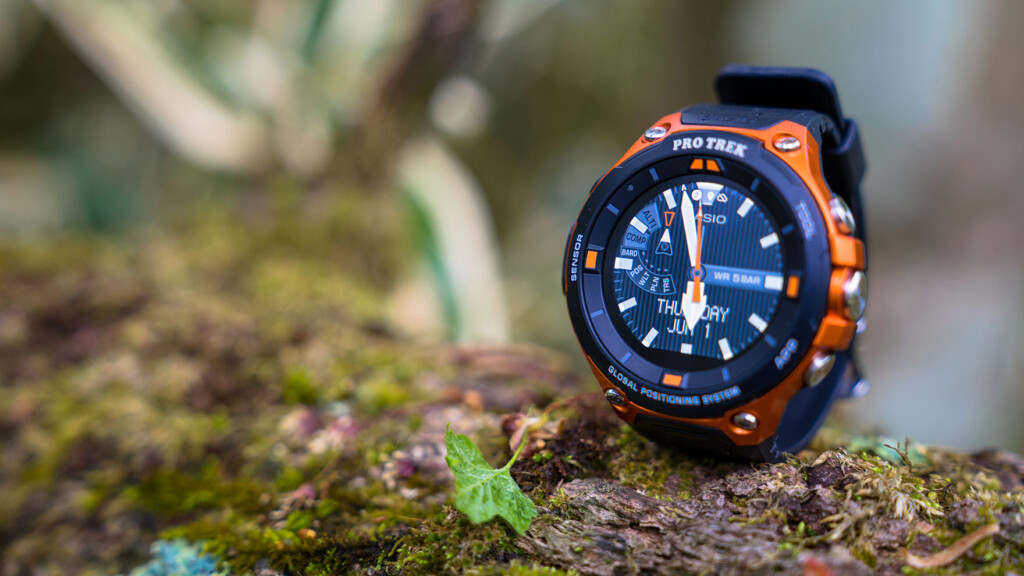
Review: Tips and tricks for getting the most out of the Casio PRO TREK Smart WSD-F20 outdoors, a camera you'll never want to let go of

Written by Yasushi Hisatomi
It has been about a month since the release of Casio's first PRO TREK with built-in GPS, the WSD-F20
As I mentioned in my previous article, its performance and ease of use exceeded my expectations, but as I continued to use it for trekking and everyday use, I grew more and more attached to it, and before I knew it, this new companion had gone from being just a hobby gadget to being an essential piece of outdoor gear for the field
This time, I would like to review the appeal of this outdoor smartwatch that has satisfied such serious outdoor enthusiasts, and share some tips and tricks for using it that I have arrived at after trying out various ways to use it optimally, mainly for trekking purposes
table of contents
table of contents
- A review of the appeal and features I realized after using it for a month
- Tips and points to make full use of your equipment when climbing mountains
- Summary and expectations for the future (page 2)
A review of the appeal and features I realized after using it for a month ( see the previous review for details )
Appearance and Hardware
This is a recap from our previous review, covering the hardware features and usability of the WSD-F20
- A more refined design
- Stress-free weight for its size
- Simple button configuration
- MIL-STD-810G compliant, 5 ATM water resistant, and cold-resistant to -10°C
- A two-layer structure of a 1.32-inch color TFT LCD and monochrome LCD that combines visibility and energy efficiency
- Highly sensitive touch screen
- Battery life is satisfactory, rechargeable lithium-ion battery
In particular, over the past month I have used it in the rain and even accidentally knocked it to the ground, but there have been no particular problems, and this month of use has once again confirmed that it has sufficient durability unless used in extremely extreme conditions
Functions and Software
As I continued to use the watch, I was able to create an environment that suited me, adjusting the functions and software to suit my needs, which significantly reduced stress and wasted battery life. When you're satisfied with the hardware, the freedom to set up Android Wear is incredibly reassuring
- "Location Memory" full-color offline map using low-power GPS (Mapbox Inc. *Google Maps is also available online)
- Easy access to compass, altimeter, barometer, sunrise/sunset, tide graph and activity graph
- Convenient and cool original watch faces
- Activity app, activity measurement and notification function by MOMENT SETTER+
- High degree of freedom to install Android Wear compatible apps from Google and third parties
Tips and points to make full use of your equipment when climbing mountains
As I mentioned in my previous review, even if Android Wear devices have excellent hardware and standard features, that doesn't mean that any user can enjoy them immediately and without stress. Unlike the iPhone (Apple Watch), while individuals can customize them to a certain extent, to get a 100% comfortable experience, it's necessary to tune the hardware settings and apps you use to your liking
So, from here on, we'll look at some tips and points to keep in mind when using the WSD-F20 comfortably for mountain climbing or trekking, starting with the basic settings
Preparing the WSD-F20 for outdoor use
First, let's talk about the preparations you need to make before using the map, activity tracker, and progress notification features. These are steps you'll need to take to master the watch outdoors, so be sure to understand them. For detailed instructions, please refer to the instruction manual or Casio's support page.
Although it is not necessary at this time (June 8, 2017), the system itself may be updated in the future, so be sure to check whether your Android Wear system is up to date and update it if necessary
- Enable the Play Store on your device
- Update your apps to the latest version
- Setting the location information of the device and smartphone
- Enable CASIO MOMENT SETTER+ "Permissions"
- Set "Save daily activity records" to "ON"
- Start the app and complete the first tutorial that appears
Genuine or not, what's the best app to use when you're on the move?
Perhaps the most difficult thing about using an Android Wear device is deciding which app is best to use. Of course, if you just want to check maps and altitude, the built-in features are sufficient, but if you're wearing a smartwatch, you should definitely use more advanced features like notifying you of various situations and saving and sharing your activity history
For popular activities like running, there are countless apps available, so it can be frankly overwhelming to choose one. In comparison, there are only a handful of apps that are useful for mountain climbing, so it may be relatively easy to choose one
However, to be honest, I still haven't found a definitive answer, so it's not easy to find an app that's perfect for everyone. The only way to avoid regrets is to learn about the strengths and weaknesses of each app and then choose the one that's right for you
Here we have picked out some of the most popular apps that can make trekking more fun and comfortable, and have compared their features and provided brief reviews after using them in a variety of conditions, from everyday life to the field
Candidate 1: Activity app (+ location memory/MOMENT SETTER)
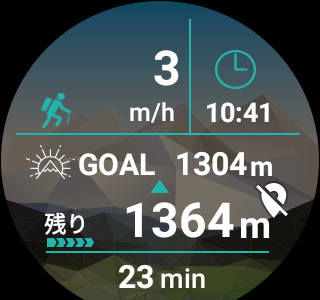
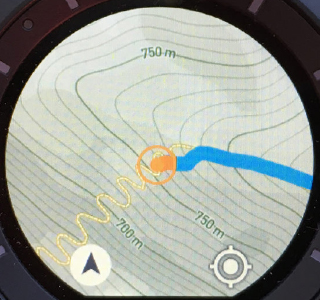
First, there's the Casio outdoor app that comes pre-installed on the device. Once you set the goal altitude and start measuring, you can conveniently check your speed, time, remaining altitude to the goal, elapsed time, and the path you walked on the map while you're out and about . The accuracy of the GPS path can be adjusted by using the "Accuracy Priority/Battery Priority" setting, which we'll discuss later. Even when set to battery priority, the track isn't too rough (see photo below), and I think it's sufficient for trekking speeds.
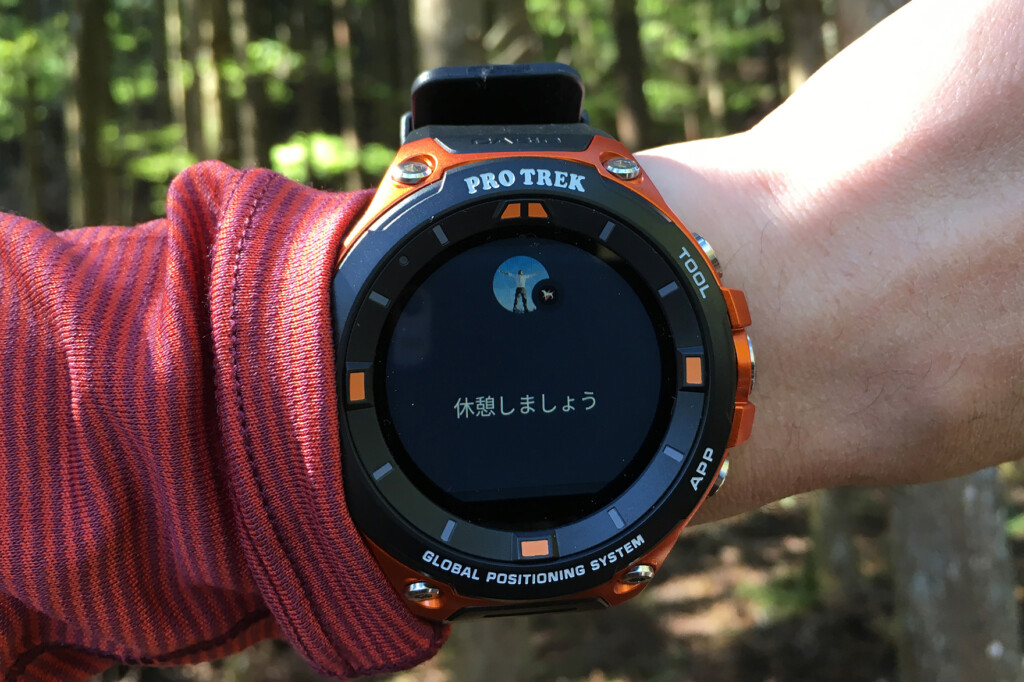
Also, while the activity app is running (measuring), Casio's original app "MOMENT SETTER" monitors your activities and automatically notifies you when you have reached the goal or how many hours have passed .
The best thing about this app is that it's currently the most battery-efficient . I'll talk about this later, but I found that if you set it to the optimum settings and limit the number of times you view maps, you can use it for about 8 hours a day with plenty of battery life. Its performance is stable (though it can be a little sluggish at times) , and it's well-optimized for the hardware. I'm also it offers settings and displays that are compatible with a wide range of activities, not just trekking, including cycling, fishing, paddle sports, and snow sports (although I haven't tried them yet).
The automatic notifications provided by MOMENT SETTER while I'm on the move are quite useful. However, when I first started using it, I had fun setting notifications for various timings, such as remaining altitude, elapsed time, number of steps, and predetermined climbing altitude, but I ended up with too many notifications and ended up getting confused because I couldn't keep track of what was being notified. Thinking about it, I can check distance and altitude from other basic displays, so for now I just me when the air pressure changes by more than 1 hPa in an hour and every time I burn 500 kcal .
The biggest drawback is you can't save or share your valuable activity logs, such as measurements taken while you were out and about, or the path you walked . It would be nice if it could be smoothly linked to major social networking services and apps, without you having to manage it yourself. This is a shame, as it's an easy-to-use app that takes advantage of being a genuine product.
Also, while Mapbox's maps are clear and easy to read, and respond quickly offline, the amount of information they provide as hiking maps is less than that of YAMAP and the like. However, personally I don't need a lot of detailed information on my watch, so I think it's fine to use them in conjunction with paper maps.
Candidate 2: YAMAP
YAMAP, now a major mountain climbing app in Japan, allows you to download maps with all the information you need for mountain climbing, such as hiking routes, course times, water sources, and mountain huts, for free and without any restrictions, and is a fantastic app that can be used even in places without a signal. It became compatible with the WSD-F20 when it was released, and although I've been using it since it was a smartphone app, I was quite excited to try linking it again this time (I'm a free member, by the way).
The maps (full-color maps with the premium plan) based on paper topographical maps from the Geospatial Information Authority of Japan that you can check while on the move are a little rougher and harder to see than Mapbox and others, but not unbearable. More than that, being able to easily check paper hiking maps on your watch is exceptionally convenient and reassuring
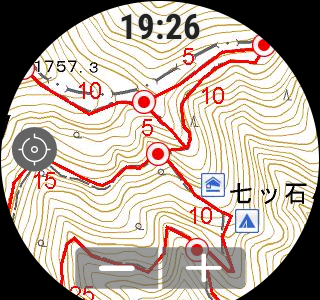
Another strength of YAMAP its social media functionality, which allows you to save and share your activity records after you've set out . You can record not only your route, time, and distance, but also photos, videos, equipment lists, and diaries on your personal page on your smartphone or PC, and share them with others. These records are valuable for recording your own mountain climbing trips, but they're also useful for using other people's records as a reference when planning future hikes.
Up to this point, it can be said that this is an ideal app in a sense, but there are some points that make it hard to be completely happyIt is difficult to say that the operation is stableIn my case,When using airplane mode to save energy, the app often fails to start when you wake it up from sleep mode and launch it*. Other issues include the fact that it takes a long time to update my current location. I've been using it for about a year now and have had a few unexplained unresponsive situations. I'm sure there's a reason for each one, but it's still stressful to have to search for a solution, restart the device, or run into these kinds of problems when I need them
Fortunately, judging from message boards and other sources, support seems to be very helpful, and there are channels open if you feel uneasy, so ultimately you can rest assured (this is different from the cold attitude of support for overseas products such as Suunto)
Another drawback is that if you want to manage a variety of activities, such as running as well as mountain climbing, the mountain climbing-specific features, interface, and design (worldview) can be quite uncomfortable . This is understandable, as it evolved from a mountain climbing SNS, but for someone like me who does both mountain climbing and trail running, it's the running that makes you want to collect and analyze detailed data later, and in that case, you'll actually want to choose an app with more comprehensive running management and sharing functions. Furthermore, a design tone and manner that boosts motivation is also an important factor.
*As of June 14, 2016, the issue of the device not starting up properly after waking up from sleep mode in airplane mode appears to have been mostly resolved with the latest update
Candidate 3: STRAVA (+Location Memory)
So, what I've ended up doing so far is using STRAVA, an app that allows you to record, analyze, and share a wide range of sports and outdoor activities, from running to canoeing and skiing, all in one place, in conjunction with Location Memory (standard offline maps). This app only displays elapsed time and distance traveled on the smartwatch. It's essentially just a GPS recorder. If that's all you need, then the aforementioned activity apps with their diverse display and notification features, or YAMAP with its rich map display, are clearly more convenient
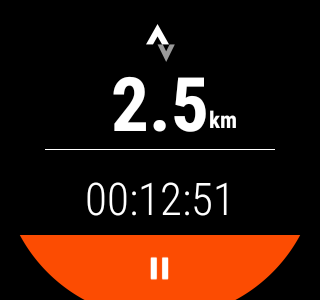
However, this app has strengths that other apps don't have: versatility that supports a wide range of activities and devices, detailed data analysis that rivals the proprietary services of Sunto and Garmin, and motivational power, such as the ease of sharing with groups .
So I just leave this app running to get logs for later management, and then I launch the location memory each time I want to check my current location or the path I walked. In a sense, it's a bare minimum function, but in reality, there are probably people who don't check their walking speed multiple times while they're out and about, so this should be enough for many people
Furthermore, if you use it in conjunction with an activity app, even if it consumes a little battery, you can create a flawless and comfortable environment, from notifications and map functions during your activity to comprehensive analysis and social media functions after your activity .
In my case, I also use outdoor watches from Suunto and Garmin, and these watches have a function that automatically uploads the activity logs recorded on each to STRAVA , so I find it very helpful to be able to centrally manage the records from various devices on this app (SNS).
Tips for choosing apps for the WSD-F20
- If you prioritize convenience while on the move and battery life, we recommend the Activity app and MOMENT SETTER
- If you want to always check a comprehensive map like a mountain climbing map on your watch, or if you want to use a community of many Japanese mountain climbers, we recommend YAMAP
- We recommend using STRAVA and location memory together if you want to use it with a variety of activities and devices, want to analyze your performance in detail, and want a high degree of freedom and the peace of mind of a global standard
| App | Activities (standard) | YAMAP | STRAVA (+Location Memory) |
|---|---|---|---|
| Here is ◎ |
|
|
|
| Here is △ |
|
|
|
| Map display | Maps from MAPBOX can be displayed offline (must be downloaded in advance each time). You can also choose the visual style of the map, such as "street," "satellite," or "outdoor." | Mountain climbing maps based on topographic maps from the Geospatial Information Authority of Japan can be used offline (downloaded maps can be stored on the watch as long as capacity allows) | The app itself does not have a map display function |
| Recording and saving of action logs | While you are moving, you can check your speed, time, remaining altitude to the goal, elapsed time, and track on the map, but the record cannot be saved even after you finish | Various data during activity can be recorded and made public and shared | Various data during activity can be recorded and made public and shared |
| Notifications and Announcements | The watch has a function that notifies you when various conditions you set are met | Nothing in particular | Nothing in particular |
| Activity history management and SNS functions | No functionality as it is not possible to save behavior logs | Saved activities can be viewed and shared on PC or smartphone. The visibility can also be individually set. Paid plans include features such as displaying other people's walking paths on a map | Saved activities can be viewed and shared on PC or smartphone. The visibility can also be individually set. Paid plans allow for more detailed data analysis and the design of training plans |
| Integration with other devices and apps | Nothing in particular | Track data (GPX files) can be imported and exported | In addition to importing and exporting track data, you can also automatically upload activities recorded on other devices such as Suunto and Garmin |
| Battery efficiency | ◎ | ◯ | ◯ |
*If you export a KML file using the Location Memory app, you can view it in Google Earth